MT5 drawdown indicator for prop firm accounts: Room Tracker
Know your room before you risk, live on your MT5 chart. Daily floors move at your firm's reset, not yours. The Room Tracker reads your terminal's balance and equity on every tick and shows the room left, which floor binds first, and when the day resets. It never places or closes a trade.
Day started at 100,000; FTMO's daily floor is 5% of the initial balance under that, its max floor 10% under the initial. The same arithmetic runs in the indicator, on your real equity. A limit is broken only below the floor, not at it.
The daily floor resets on the firm's clock. For FTMO that is midnight in Prague, and the server hour it lands on moves with summer time.
Open trades count. Equity, not balance, is what reaches the floor, so a good day can still be one bad hour from a breach.
Trailing max floors rise and never fall back, so yesterday's room is not today's.
How it works
Attach and pick
Drop it on any chart, choose your firm and program, enter the account size and the stop distance you size with.
It reads the terminal
Balance and equity come from your MT5 terminal on every tick. Finished days are saved on your computer, so the floors carry over a restart.
Glance or get pinged
The card shows the room. MetaTrader's own push alerts your phone at 50%, 75% and 90% of the day's room used, and 15 minutes before the reset.
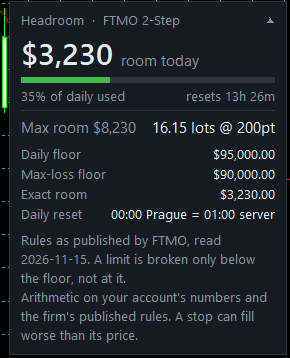
What the card tells you
- Room to the binding floor, labelled daily or max, whichever is nearer.
- A bar for the share of today's room already used.
- The reset countdown, on the firm's own clock.
- Max room, so both floors are in view.
- Size that fits: the largest lots whose loss at your stop distance stays inside the room, net of commission. A stop can fill worse than its price.
- The rule it used: "Rules as published by FTMO, read 2026-11-15".
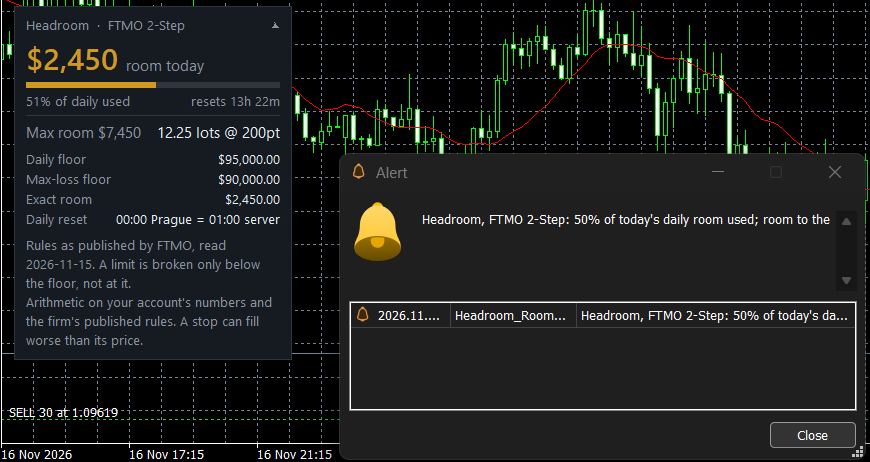
The 50% alert. Each level alerts once a day; the same text can reach your phone through MetaTrader's push notifications.
It never touches your trades
| Typical equity protector | Room Tracker | |
|---|---|---|
| Your orders | Closes or blocks them at a % you type | Never places, changes or closes one |
| The limit it uses | A number you enter | The firm's own rule, with its read date |
| The reset | Often server midnight | The firm's clock; FTMO's at midnight Prague |
| Tested how | Rarely stated | Against the firms' own worked examples, 138 checks |
Firms and programs
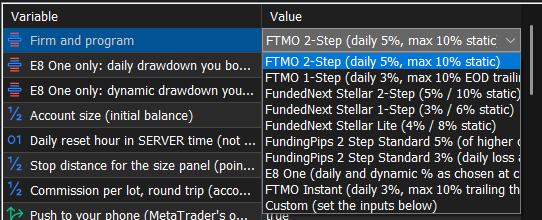
Each preset is read from the firm's own help pages and checked every week. A copy more than 60 days past its read date says so on the panel. Firm names say whose published rules a preset follows; Headroom is not affiliated with any of them. The same rules run in the free web Room Tracker.
Pricing
Up to 3 MT5 accounts per licence; move it to a new account by email. Refund within 7 days of your first purchase, by email to desk@headroomdesk.com. Prices in USD; taxes added at checkout where they apply. Not available in India. Payments are handled by Dodo Payments, our merchant of record; your licence key and download link arrive by email right after payment, and the latest version is on Your downloads. The buttons open once Dodo Payments has finished its review of this product. Refunds · Terms
What it does not do
- Stop a breach: a gap can cross a floor between two ticks.
- Check the gain needed to pass, minimum days, consistency or news rules.
- Watch several accounts at once: one terminal, one account.
- Read your firm's dashboard. Where they disagree, the firm's number counts.
Records you can check
- Rules read date on every preset and on the panel.
- Changelog below: every version dated, with what changed.
- SHA-256 of each released file, so you can check your download.
- No reviews yet: this page will show real ones when there are some.
What you need
- MetaTrader 5 desktop (tested on Windows). Not MetaTrader 4, and not the mobile app on its own: the phone only receives the alerts.
- An account at a firm whose rules the indicator carries, or the Custom preset for another firm.
- Nothing else: no DLL, no web requests, no account with us. Your day's history is kept in your terminal's own files folder.
Changelog
- 1.03 (2026-11-18): each alert level is sent once a day even after a timeframe or input change; clearer card when E8 One is waiting for your %. 138 of 138 checks pass in MetaTrader 5.
- 1.02 (2026-11-18): E8 One has no default (the panel waits for the % you bought); rules-age warning after 60 days.
- 1.01 (2026-11-17): first release candidate, tested in MetaTrader 5's tester against the firms' own worked examples.
Questions
Does it trade?
No. It is an indicator: it reads balance and equity and draws a card. MetaTrader 5 does not let indicators send orders.
What data does it send?
Nothing reaches Headroom. No web requests, no DLLs. Phone alerts, if you turn them on, go through MetaTrader's own push service. Saved days stay in your terminal's files folder.
What if my firm changes a rule?
The rules are checked against the firms' pages every week. A changed rule ships as an update within 7 days, listed in the changelog above with the new read date.
Can it keep me from breaching?
No tool can. It shows the room and warns early. The firm's own counter decides, and a gap can cross a floor between ticks.
Is it allowed by my firm?
It never touches orders, but each firm sets its own rules on third-party tools. Check your firm's terms.
MT4, cTrader, futures platforms?
MetaTrader 5 only. For Topstep, Apex and other futures firms, the free payout checker and consistency rule calculator cover the payout rules.
Related
- Web Room Tracker: the same rules in your browser, free
- Daily loss rules compared: FTMO, FundedNext, FundingPips and E8
- Balance or equity: what the daily limit counts
- When each firm's day resets